.A VGA connector is a video port that makes a connection between a computer and a monitor. VGA connectors are older techniques that were used before digital ports. But some advanced connections, such as HDMI and DisplayPort, are also employed, and VGA is also part of older systems and industries. In this tutorial, we will cover detailed features of VGA connectors and related features. So let’s get started with an introduction to VGA connectors.
What Is a VGA Connector?
- VGA’s full form is ‘Video Graphics Array’, which is a standard connector part of a computer’s video output. VGA was developed by IBM for a new PC line known as the PS/2. It comes with 5 pins in rows; each row has 15 pins in connectors.
- It is an analogue connector that delivers variable voltage. It is the reverse option to digital video interfacing, such as HDMI. A device transmitting a digital video signal transmits ones and 0s through wires and provides a constant voltage.
- These connectors were first defined in 1987 for IBM’s PS/2 and its VGA graphics system and are now important for monitors, HD television sets, and projectors.
- VGA operated through transmitting analogue green, red, and blue signals, as well as synchronisation with the regeneration of photos on the overscreen
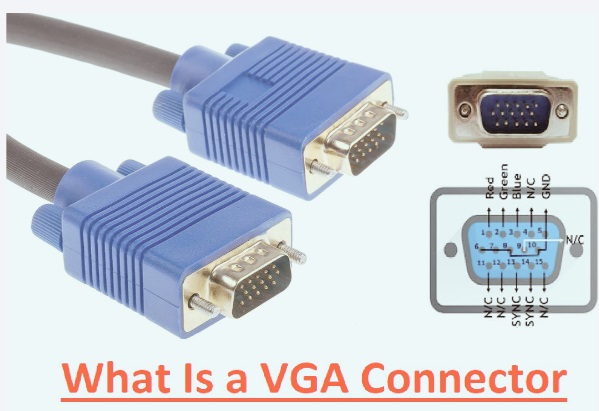
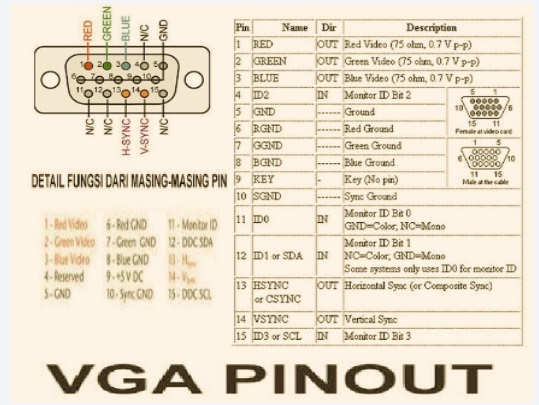
VGA Pinout diagrams
| Pin No. | Signal Name | Working / Function |
| 1 | Red Video | transmit red color video signal |
| 2 | Green Video | green color video signal carries |
| 3 | Blue Video | blue color video signal carrier |
| 4 | ID2 / Reserved | Monitor identification or reserved function |
| 5 | Ground | Grounding |
| 6 | Red Ground | Ground for red video signal |
| 7 | Green Ground | Ground for green video signal |
| 8 | Blue Ground | Ground for the blue video signal |
| 9 | =+5V DC | Supplies +5V power (used in some monitors) |
| 10 | Sync Ground | Ground for synchronization signals |
| 11 | ID0 / Reserved | Monitor identification data |
| 12 | DDC Data (SDA) | Data channel for monitor communication |
| 13 | Horizontal Sync | Synchronizes horizontal scanning |
| 14 | Vertical Sync | Synchronizes vertical scanning |
| 15 | DDC Clock (SCL) | Clock signal for monitor communication |
Some Misconceptions of VGAA
- A common misconception of VGA is audio support. It comes with an analogue audio signal having right and left channels but performs signal transmission through a distinct cable; normally, 3.5mm jacks are used.
- A video signal is transmitted with a VGA cable and then converted to a monitor-compatible form.
- IBM made two VGA connectors; one has 5 pins in a single row and 3 pins in one row. The D-subminiature type comes with 3 hooks.
- The D-sub version is commonly used on older computers, displays, and VGA cables. DB-15 is a 5-pin row type.
Features and Specifications of VGA Connectors
Feature / Specification | Details |
| Full Form | Video Graphics Array (VGA) |
| Connector Type | 15-pin D-sub connector (DE-15) |
| Signal Type | Analog video signal |
| Number of Pins | 15 pins arranged in 3 rows |
| Color Support | Supports RGB (Red, Green, Blue) signals |
| Resolution Support | 1920×1080; higher resolutions possible with quality cables |
| Refresh Rate | 60 Hz to 85 Hz |
| Audio Support | No audio transmission |
| Transmission Medium | Copper cable |
| Cable Length | Recommended up to 5–10 meters without signal loss |
| Synchronization | Separate Horizontal Sync and Vertical Sync signals |
| Plug-and-Play Support | Supported with DDC communication |
| Common Devices | Monitors, projectors, desktop PCs, and older laptops |
| Connector Gender | Male and female versions |
| Power Demand | Passive interface; some pins offer +5V |
| Video Quality | Less than digital interfaces like HDMI and DisplayPort |
| Hot Swapping | Limited support |
| Shielding | Shielded cable reduces interference |
| Standard Color | blue connector housing |
| Main Advantage | compatible and inexpensive |
| Main Limitation | An analog signal may suffer from noise and quality loss |
Different VGA Connector Types
VGA connectors have different types and configurations with mounting designs. Each type performs certain design features and installation processes. some main types of areas
VGA Male Connector
- VGA male connectors come with 15 pins and are used at the end of a VGA cable and connected into a female VGA port.
VGA Female Connector
- These connections come with 15 holes or sockets compared to pins. It exists in computers, projectors, and monitors.
Panel-Mount VGA Connector
- It is configured over devices, panels, or enclosures. It connected with a screw to offer a proper connection.
PCB-Mount VGA Connector
- is directly connected on the PCB board; PCB-mounted VGA connectors are part of embedded systems and electronics circuits
Right-Angle VGA Connector
- In this VGA connector, the pin is bent at 90 degrees and is best suited for compact designs.
Low-Profile VGA Connector
- It’s used for different devices having limited spaces, like thin industrial modules.
VGA Connector Type | Pin Configuration | Mounting Style | Connector Orientation | Space demand | uses |
| VGA Male Connector | 15 Pins | Cable-End Mount | Straight | Standard | VGA Cables |
| VGA Female Connector | 15 Socket Holes | Panel/Device Mount | Straight | Standard | Monitors, PCs, Projectors |
| Panel-Mount VGA Connector | 15 Pins/Sockets | Screw Panel Mount | Straight | Mid | Enclosures, Control Panels |
| PCB-Mount VGA Connector | 15 Pins/Sockets | PCB Solder Mount | Straight | Compact | Embedded Systems |
| Right-Angle VGA Connector | 15 Pins/Sockets | PCB or Cable Mount | 90° Angle | Space Saving | Compact Devices |
| Low-Profile VGA Connector | 15 Pins/Sockets | Low-Height Mount | Straight/Right-Angle | Minimal | Thin Industrial Modules |
VGA Signal
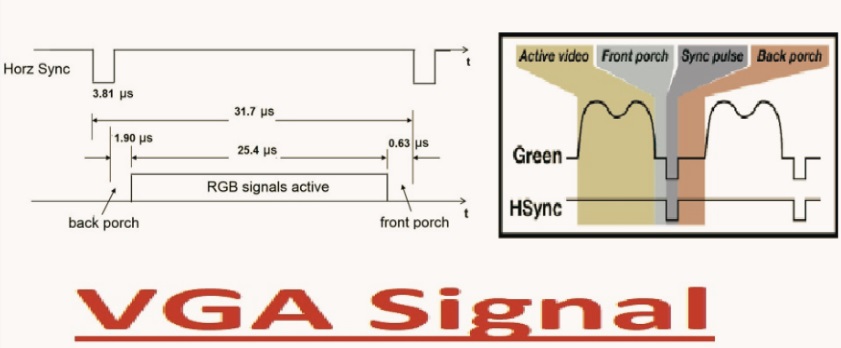
- VGA connectors transmit analog video signals from the computer to the monitor or projectors. It carries 3 color signals, green, red, and blue, that make a complete color spectrum onscreen.
- With that, RGB VGA also sends synchronization signals.
- Horizontal Sync (HSYNC): that is configured with the start of each pixel’s line.
- Vertical Sync (VSYNC): configured the start of each frame.
Some pins are incompatible with display data channel communications. It helps monitor the delivery of resolution and computer features.
How VGA works
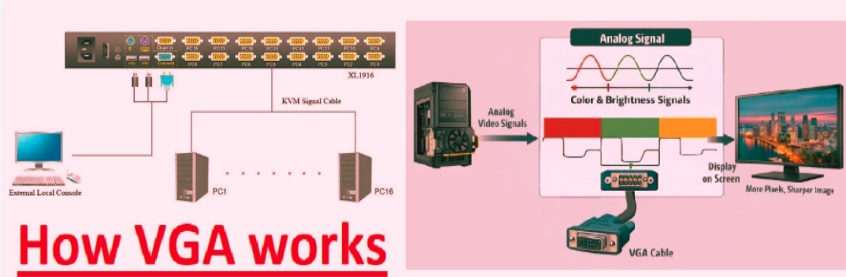
- The computer produces analog voltage signals for green, red, and blue channels, denoting pixel brightness.
- These signals are delivered to the monitor through a VGA cable.
- Through the help of HSYNC and VSYNC signals, the monitor arranges input color data into lines and frames and makes a coherent image.
- Grounded pins and shielded cables minimize interference for proper signal transmission.
- VGA operates by transmitting a continuous voltage for each color pixel through synchronization of display timing. that provide detailed visual results on the screen
How to select a VGA connector
- Selection of VGA connector: first of all, note the connector category, whether the device requires a male or female connector according to the requirement. After that, follow the mounting configuration and apply a PCB mount connector for the PCB board design and a panel mount for enclosing devices and panels.
- It is good to check cable quality and shielding, since proper shielding minimizes signal noise and provides a clear image.
- Focus on quality like materials, strength, and a strong screw lock for offering strong connections.
- Check that the connectors according to the standard 15-pin DE-15 are configured to provide support.
- follow to use needed cable length, since a longer cable is used for accurate shielding or a signal booster for providing detailed video
Troubleshooting VGA Connection Problems
VGA connection faults result in issues like zero display, unclear images, and flickering screens. Normally, faults are related to loose connections, affected cables, and errored display settings.
- First, check if the VGA cable is strongly connected and the screws are accurately connected. Loose connections affect RGB.
- After this step, check the connector pin for broken pins that cause no signal. If you find a damaged pin, replace the cable.
- If the image is not clear, use a quality shielded cable. Analog signals become weaker for long distances. With that, check the computer display resolution settings and check according to the monitor’s required resolution.
- If faults are not solved, check the cable with a meter or use a different cable for finding faults still exist in the cable graphics port or monitor
How to test a VGA cable with a multimeter
- Using a VGA cable to test the multimeter set continuity mode on the multimeter. This testing helps to check to find the pin on one cable end accurately connected with the matching pin on the other end.
- First of all, find the pin title with the following VGA pinout details; after that, connect one probe to the first pin of the first connector and the other lead to pin 1 of the other connector.
- If the meter shows less resistance, it means the connection is accurately made; again, perform this process for all 15 pins.
- After performing short circuits, check the testing of adjacent pins. There is no continuity needed between other pinouts. The cable is damaged if the meter shows beeps between two irrelevant pinouts.
- Testing offers accurate signal flow for RGB signal grounding connection synchronization lines to avoid display faults such as color losses, signal losses,
VGA vs HDMI Comparison
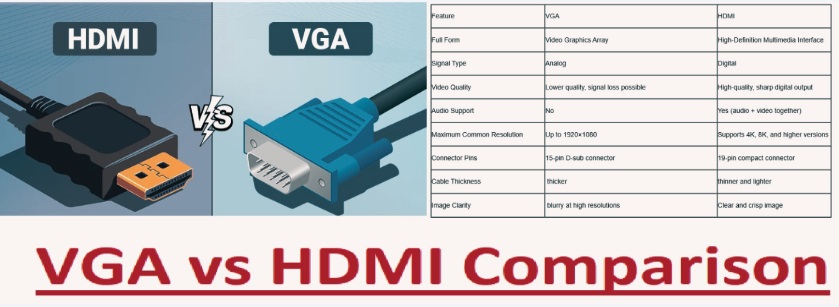
| Feature | VGA | HDMI |
| Full Form | Video Graphics Array | High-Definition Multimedia Interface |
| Signal Type | Analog | Digital |
| Video Quality | Lower quality, signal loss possible | High-quality, sharp digital output |
| Audio Support | No | Yes (audio + video together) |
| Maximum Common Resolution | Up to 1920×1080 | Supports 4K, 8K, and higher versions |
| Connector Pins | 15-pin D-sub connector | 19-pin compact connector |
| Cable Thickness | thicker | thinner and lighter |
| Image Clarity | blurry at high resolutions | Clear and crisp image |
| Compatibility | Older monitors/projectors/PCs | Modern TVs, monitors, gaming consoles |
| Hot Plugging | Limited | Fully supported |
| Copy Protection | Not supported | Supports HDCP (content protection) |
| Gaming Performance | Less good for modern gaming | for gaming and multimedia |
| Transmission Distance | work over longer distances but quality drops | Good quality over moderate distances |
| Common Devices | CRT monitors, old projectors | Smart TVs, laptops, consoles, Blu-ray players |
| Introduced | 1987 | 2002 |
| Best Use Case | Legacy hardware support | Modern high-definition multimedia systems |
| Overall Performance | Outdated technology | Faster, clearer, |
VGA Advantages
- VGA compatible with older computers, projectors, and monitors and versatile design.
- It can easily connect and troubleshoot since it transmits RGB analog signals.
- It is lower cost than modern digital replacements.
- It is helpful for conversion to HDMI, DVI, or component video.
VGA Disadvantages
- VGA connections offer low resolution, and for longer cables, VGA signal quality is affected.
- VGA cable transmission also faces interference. With that, signals are not transmitted over longer distances through VGA cables that are short in gauge.
- For longer cables, VGA signal quality is affected. VGA just transmits video signals that need distinct audio connections.
- Standard DE-15 connectors are a larger size than compact digital modules such as DisplayPort.
VGA Bandwidths
116 MHz high bandwidth range that is transmitted with a VGA cable that is less than 240 Hz displays. Normal VGA’s 15 MHz bandwidth value is lower, and UXGA’s highest bandwidth range is the largest value.
Display Standard | Bandwidth |
| VGA | 14 MHz |
| SVGA | 27 MHz |
| XGA | 48 MHz |
| SXGA | 79 MHz |
| UXGA | 116 MHz |
Conclusion
VGA connectors are commonly used for electronic devices like computers and TV screens, and for digital connections, HDMI and DVI are commonly used. For conversion connection types, connect an adapter that shifts from one interface to another.
Frequently Asked Questions
What is the full form of VGA for computers?
- VGA’s full form is Video Graphics Array. VGA is an analog video standard that connects computers with monitors.
Is VGA still compatible with modern computers?
- New laptop models do not come with VGA ports. Some desktops, personal computers, and servers are compatible with VGA models.
What is the highest resolution VGA compatible?
- VGA-supported resolutions of about 1920 x 1080 for proper working conditions, their working based on cable features.
How much distance can a VGA cable run without affecting quality?
- A standard VGA cable provides good working up to five meters; longer cables result in signal losses, so a booster is needed.
Can VGA be converted to HDMI?
- Yes, there is a need for active VGA to HDMI converters since VGA has analog features and HDMI has digital features.
Why does the VGA display look blurry?
- Blurry output results from longer cables, faulty shielding, bad resolution results, and signal interference.
Can VGA support 1080p resolution?
- VGA compatible with 1080p quality images based on cable and signal quality