The RJ45 conector techniques that helps to get high speed in PC and laptops. Either we wifi used on laptop for internet uses low speed for data transmission, which has chances of connections fialure. but rj45 connector is the best option that makes computer connections with a local area network by using its 8-pin interface.
In this post, we will cover detailed features, pins configuation and, and practical understnding of RJ connectors. So let’s get started.
What is an RJ45 Connector?
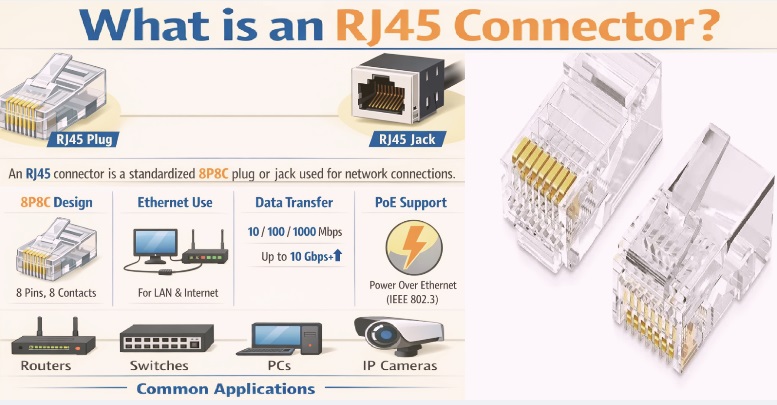
- RJ45’s full form is registered jack, which is commonly employed in Ethernet, where modems and wifi routers are employed.
- This module is also part of voice and data communications interfacing. The number 45 in the connector name shows the interfacing standards of cables.
- It was made for telephone systems but with advanced features used for Ethernet systems. Since it is compatible with digital data transmission.
- It has 8 metallic pins connecting in a compact plastic plug structure. These connections make a connection of 8 wires in Ethernet cables, in 4 copper twisted pairs.
- Electrical interfacing minimizes and clears signal flow through wire twisting.
- All Ethernet-supported devices, like switches, computers, and smart devices, use the RJ45 connector. It is also part of patch panels, wall outlets,, and keystone jacks in cabling systems.
- Its design also provides different Ethernet speed options according to cable types, such as 10 Mbps up to 40 Gbps. RJ45 connectors are also part of the modulator connector series.
Pin Configuration of RJ45 Connector
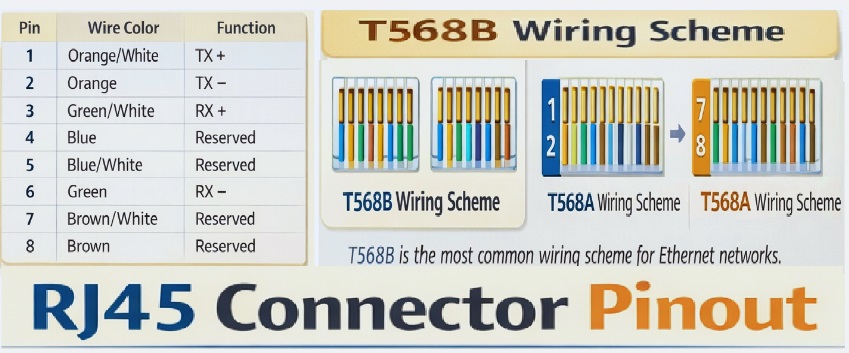
- The RJ45 connector is employed for Ethernet cables and has 8 pins. Each connector pin performs a certain function and is a colored wire according to the wiring standard, like T568A or T568B.
| Pin No. | Signal | Function of the pin | T568A Wire Color | T568B Wire Color |
| 1 | TX+_D1 | Transmit Data + | Green/White | Orange/White |
| 2 | TX–_D1 | Transmit Data – | Green | Orange |
| 3 | RX+_D2 | Receive Data + | Orange/White | Green/White |
| 4 | BI+_D3 | Bi-directional Pair + | Blue | Blue |
| 5 | BI–_D3 | Bi-directional Pair – | Blue/White | Blue/White |
| 6 | RX–_D2 | Receive Data – | Orange | Green |
| 7 | BI+_D4 | Bi-directional Pair + | Brown/White | Brown/White |
| 8 | BI–_D4 | Bi-directional Pair – | Brown | Brown |
RJ45 Features
Pinout
- The RJ45 connector comes with 8 pins that are enclosed in a metallic casing. Each pin is connected with a different wire of the Ethernet cable. Wires perform data transmission in twisted pairs. Through this wire assembly, a signal is transmitted through the internet.
Modular structure
- RJ45 connectors come with a standard design that helps to connect them to different devices like switches, computers, routers, etc. Through their modular design system, they can be easily made and modified.
Operating Temperature
- connector structure such that it is useful for different conditions like -40°C and +85°C. so best for very low and high temperature conditions
Insulation Resistance
- It provides high insulation resistance of about 500 megaohms (MΩ). It avoids current leakages between wires and control signal losses.
Dielectric Withstanding Volts
- The RJ45 connector has features to handle 1000 volts without being affected. This safety system protects from short circuits and ensures safe device operations.
Clip Lock features
- It has come with a plastic clip that causes a clicking sound when connected with the device. It saves the connector from damage and sudden unplugging.
Gold-plated pins
- Connector pins are gold-plated since gold is a good conductor and does not rust. It makes strong connections.
Durable design
- The RJ45 connector is strong and durable. andandand can easily connect and disconnect with devices without damage or affecting connections. so it’s the best option where frequent cable is needed
Wire Color Code
- Ethernet cable wires come in different color wires. Each wire color corresponds to the pin connector. So we can connect wires accurately without any mistake
RJ45 Standard
- RJ45 connector compatible with TIA/EIA-568, which is a universal standard. These connections help to connect wires easily; through this protocol, different manufacturers’ devices connect in a single assembly.
RJ45 Dimensions
- Dimensions The RJ45 connector is 21.5 mm in length, 11.7 mm wide, and 8.1 mm high. Its small and compact size makes it easy to fit with different ports.
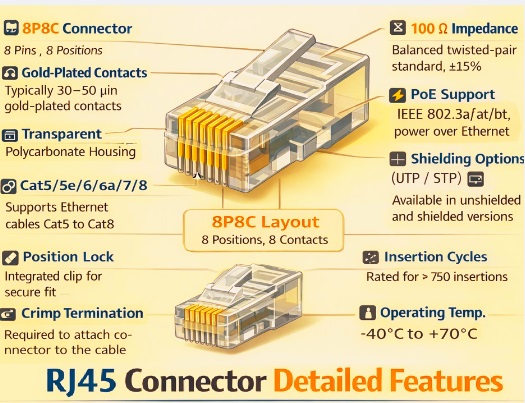
Some other technical features of RJ45 connectors are as
| Feature | Technical Details |
| Connector Type | RJ45 (Registered Jack 45) |
| Standard | TIA/EIA-568, ISO/IEC 11801 |
| Number of Pins | 8 Pins |
| Number of Positions | 8P8C (8 Position, 8 Contact) |
| Cable Type | Cat5, Cat5e, Cat6, Cat6a, Cat7, Cat8 |
| Maximum Data Rate | Up to 40 Gbps (Cat8) |
| Operating Frequency | 100 MHz (Cat5e), 250 MHz (Cat6), 500 MHz (Cat6a), 2000 MHz (Cat8) |
| Termination Method | Crimping / Punch-down |
| Wiring Schemes | T568A, T568B |
| Contact Material | Phosphor Bronze |
| Contact Plating | Gold-plated |
| Insulation Material | Polycarbonate / Thermoplastic |
| Shielding Options | Unshielded (UTP), Shielded (STP/FTP) |
| Impedance | 100 Ω ±15% |
| Operating Voltage | 125 VAC (typical) |
| Current Rating | 1.5 A per contact |
| Insertion Cycles | ≥ 750 mating cycles |
| Operating Temperature | −40°C to +70°C |
| PoE Support | Yes (IEEE 802.3af / at / bt) |
| Mounting Style | Panel Mount, PCB Mount, Cable Mount |
| Common Applications | Ethernet Networking, LAN, Routers, Switches, IP Cameras |
RJ45 Connector Colour Codes
- The RJ45 connector comes with a different color code standard for wire identification in the Ethernet cable. Its main operation is that wire connected with accurate RJ connections for accurate cable working.
- RJ45 connectors use two color codes: T568A and T568B.
- These two color codes come with different configurations of orange and green wire pairs.
| Pin | T568A | T568B |
| 1 | White-Green | White-Orange |
| 2 | Green | Orange |
| 3 | White-Orange | White-Green |
| 4 | Blue | Blue |
| 5 | White-Blue | White-Blue |
| 6 | Orange | Green |
| 7 | White-Brown | White-Brown |
| 8 | Brown | Brown |
The TB568B color code is commonly used since it is a standard code that makes the connection of different devices with an Ethernet cable.
RJ45 vs. CAT5 vs. CAT6
- RJ45 connector: a standard connection type that indicates connectors and wiring with a cable endpoint, and CAT5 is an Ethernet cable standard.
- While CAT6 is a cable and RJ45 is a connection, both make the connection of computers with an Ethernet network.
- RJ45 has 8 pins. 4 are reversible and 4 are striped pins. It’s a 4-pin part of Ethernet.
- Cat6 comes with 6 pins of different colors; one pin makes the connection of the Ethernet system.
| Feature | RJ45 | Cat5 | Cat6 |
| Category Type | Connector (Plug/Jack) | Ethernet Cable | Ethernet Cable |
| Full Name | Registered Jack 45 | Category 5 | Category 6 |
| Standard | TIA/EIA-568 | ANSI/TIA-568 | ANSI/TIA-568 |
| Function | Connects Ethernet cable to devices | Transmits data signals | Transmits high-speed data |
| Pins / Conductors | 8P8C (8 pins) | 4 twisted pairs (8 wires) | 4 twisted pairs (8 wires) |
| Maximum Data Speed | cable used | Up to 100 Mbps | 10 Gbps |
| Maximum Frequency | according tp cable | 100 MHz | 250 MHz |
| Maximum Cable Length | – | 100 meters | 100 meters |
| Connector | Cat5/Cat5e/Cat6/Cat6a | RJ45 connector | RJ45 connector |
| Crosstalk Protection | Connector-level only | Basic | Improved (tighter twists, spline) |
| Shielding Options | UTP / STP | UTP | UTP / STP |
| PoE Support | Yes (802.3af/at/bt) | Yes | Yes (better heat handling) |
| Typical Impedance | 100 Ω | 100 Ω | 100 Ω |
| Common Applications | Routers, switches, PCs | Fast Ethernet networks | Gigabit & high-speed LANs |
| Backward Compatibility | – | Compatible with Cat3 | Backward compatible with Cat5/5e |
| Cost | Low | Low | Medium |
RJ45 VS RJ11
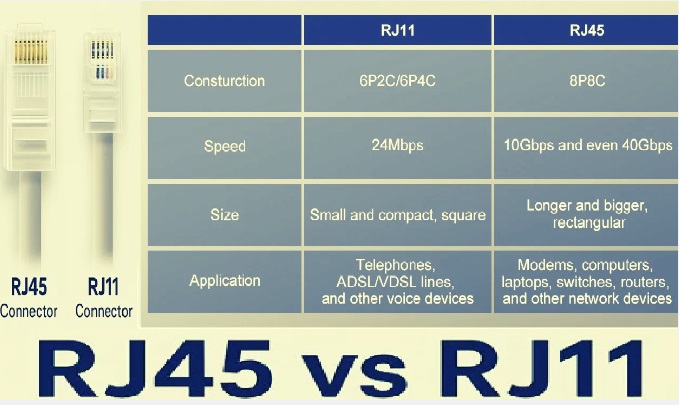
- RJ45 connectors are employed with CAT5 and CAT6 cables, and RJ11 works with phone cables and stitches.
- personal computer and some other devices of copper cable network connected to RJ45 and RJ11 connections come with 2 sockets in a dual-line phone system
| Feature | RJ45 | RJ11 |
| Full Form | Registered Jack 45 | Registered Jack 11 |
| Connector Type | Ethernet / LAN Connector | Telephone Connector |
| Number of Positions | 8 Positions | 6 Positions |
| Number of Contacts | 8 Contacts (8P8C) | 2 or 4 Contacts (6P2C / 6P4C) |
| Primary Use | Computer networking | Telephone & DSL lines |
| Supported Signals | Digital data | Analog voice / low-speed data |
| Maximum Data Speed | 10 Gbps+ (depends on cable) | Very low |
| Operating Frequency | 2000 MHz (Cat8 cable) | Below 1 MHz |
| Cable Types Used | Cat5, Cat5e, Cat6, Cat6a, Cat7, Cat8 | Flat or twisted telephone cable |
| Typical Impedance | 100 Ω | 600 Ω (telephone standard) |
| Connector Width | Wider | Narrower |
| Pin Spacing | Smaller | Larger |
| PoE Support | Yes (IEEE 802.3af/at/bt) | No |
| Wiring Standard | T568A / T568B | USOC |
| Shielding Options | UTP / STP / FTP | Typically unshielded |
| Insertion Cycles | ≥ 750 | ~500 |
| Backward Compatibility | Not supported with RJ11 | Can physically fit into RJ45 jack |
| Common Devices | Routers, switches, PCs, IP cameras | Telephones, fax machines, modems |
Types of RJ45 Connectors
Pass-through RJ45 connector
- Standard connectors are non-straight-through connectors. Butt pass-through connectors help 8 colored copper wires in the cable to move through connectors that are easy to access and configure during the construction of Ethernet cables.
Shielded and Unshielded Connectors
- Commonly unshielded connectors are used in Ethernet cables. Since they are lightweight, easily connect, and come with a plastic structure that is best for small systems
- Shielded RJ45 connectors use a metallic shield for handling electromagnetic interference. metallic shield made of nickel materials. So these connectors easily handle EMI effects. It protects the data signal moving through the cable and provides safe operation of the system.
- Shielded RJ45 connectors configured with shielded Ethernet cables for increased working performance.
Standard & Toolless Connectors
- Standard RJ45 connectors use special tools to remove Ethernet cables like crimping pliers. While toolless RJ45 connectors do not use crimping tools for Ethernet removal.
- These toolless connectors provide easy terminations and have reusable features.
How to Connect the RJ-45 Connector to the Network
For the connection of the RJ45 connector in the system, a single RJ45 connector, crimping tools, and an Ethernet cable are used. steps explained for RJ connector connections in the network
Cable cutting is needed. Length
- First of all, cut the length of the cable according to requirements with some added allowance.
Cable stripping
- Put the cable in the crimping tool and squeeze the handle tightly. Remove the sheath of wire and get 4 twisted-pair wires.
Untwisting Wires
- Prepare 8 wires for sorting through untwisting and straightening. Cut the cable, having a plastic separate point where the sheath starts.
Wire arrangement
- for making crossover or straight-through cable configuration wires according to the required order, like T568A or T568B
Wire cutting
- Cut wires with the same length and leave some point from the sheath. Put these wires into the cutting part of the crimping tool, and cut through, pressing the handle.
Wire insertion into the RJ45 connector
- RJ45 connector Hold through the clip, and set 8 metallic pins in front. Then, put wires into the metallic grooves of the connectors and apply force on the wires to reach 8 wires to the end. Check that all wires have a half-centimeter sheath in the connector.
Connector crimping
- Put the connector into the crimping part of the tool and squeeze the handles tightly. Cut the pin properly and connect it with the wire.
Crimped Connector Inspection
- Disconnect the connector with the crimping tool and check all pins. Slowly pull the wire from the connector to check that the connection is strong.
Cable types of RJ45
RJ45 connectors operate with different Ethernet cable configurations, and each works in different conditions with different speeds.
Cat5 cable
- It is an older version of Ethernet cable and is used for older applications. These cables are used for the connection of computers and other devices. These cables transmit data with 10 to 100 megabits per second.
- These wires are in a twisted configuration to minimize signal distortion. In older applications, these cables connect the computer to the internet.
- But now it is an outdated cable replaced with an advanced system.
Cat5e cable
- Cat5e is an advanced version of Cat5c cable; the letter “e” is used for enhanced features. This cable has features to deliver data with a speed of 1 gigabit per second, which is larger than Cat5.
- This cable transmits data about 100 meters. In this cable, wires are strongly twisted compared to Cat5, which avoids signal distortion.
- So it makes strong connections and is still used in business and homes for data transmission.
- It is a low-cost option and is used for different internet applications like games and browsing sites.
- But for some advanced options, it is a slow-speed module.
Cat6 Cables
- Cat6 is an advanced and high-speed cable compared to Cat5e. It is compatible with 10 gigabits per second but transmits a signal to 55 meters. Wires in this cable are highly twisted, and some types use plastic coating to prevent interference.
- Cat6 provides high-speed internet for sharing larger data between different computers. Its cost is also low.
Cat6a cables
- Cat6a is an advanced type of Cat6, and the letter “a” is augmented, which means it’s an improved version. This cable transmits data at 10 gigabits per second. It transmits data to 100 meters and part of larger offices, schools, and buildings.
- Cat6a has strong protection from noise and does not affect the signal from other wires’ signals.
- Either these cables are thick in design and difficult to bend but are the best options where high-speed and long-distance transmission are needed.
- It costs more than Cat6 but works well for larger systems.
Computer system
- RJ45 connectors are part of computer applications. It makes connections between switches, servers, and other devices through Ethernet cables. This technology transmits data fast between devices and data centers. In small businesses and larger offices, RJ45 is the main component of the transmission system.
Internet
- RJ45 connectors also make connections between devices and the internet system. They make connections between routers, modem switches, computers, and game consoles. These wire connections are preferred over wifi connections since they are stable and transmit data at a higher speed.
Phone Systems
- These connectors are also part of the phone’s system for data communication through the internet. These phones transmit voice signals through Ethernet cables in the computer system.
- It makes flexible transmission through phones and calls.
Audio & Video Signal Transmission
- This connector has features to transmit visual and audio data in different systems, such as IP-based HDMI. that deliver quality signal over Ethernet cables better than HDMI CABLES. It is part of digital displays and home theaters.
Security system
- These connectors are also part of the security system for the connection of the camera with the recording and monitoring system. Through power over Ethernet, a single Ethernet cable delivers data and power to security cameras.
- So our homes, offices, businesses, and buildings’ security systems use these connectors.
Industrial uses
- Connectors are also part of industries for making connections between machines, sensors, and control systems. These connectors also manage electrical noises and vibrations.
Physical Dimensions of RJ45 Connectors
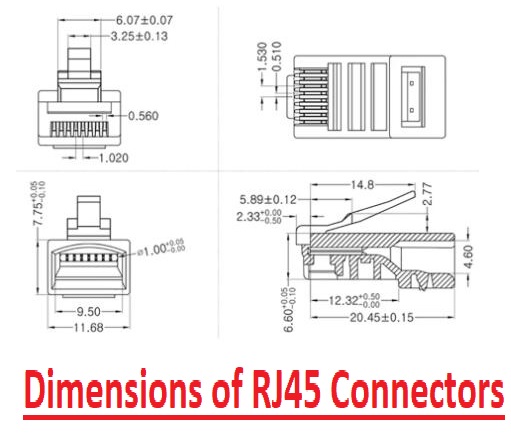
Dimensions details of rj45 connectos are as
| Part | Measurement | Features |
| Length | 20.45 mm | length of the plug |
| Width | 11.68 mm | Widest part of the connector |
| Height | 7.75 mm | base to top, locking tab |
Contact Pin Pitch | 1.00 mm | Distance between single 8 pins |
Contact Area Width | 9.50 mm | Width where 8 pins are aligned |
Latch Length | 14.8 mm | Length of the locking tab |
| Latch Height | 2.77 mm | tab sticks out from the body |
Body Depth | 12.32 mm | front of the plug to where the cable starts |
| Stack Height | 6.60 mm | Vertical size from base to top |
Selecton factor of RJ45 connector?
physical structure
- Check the physical design of connections, as a proper working connector has a smooth, clear, and shiny surface free from impurities. They also have metallic shielding that is good but makes it costly.
- The most preferred plating is gold and yellow; after that, white and yellow nickel plating is preferred.
Cable Length
- First, find the cable length according to your requirements. Since cable length is an important factor for defining signal quality according to Ethernet standards, Cat5e, Cat6, or Cat6a.
- Longer distance needed quality cables and connectors for accurate signal performance and reduced signal losses
Shielding requirements
- For locations where high interference exists, shielded RJ45 connectors are used to prevent signal distortion. For areas where low distortion exists, unshielded connectors are best to use.
Pinout confirmation with system protocol
- Check that the connector pins are supported with communications protocols. Normally, these wiring configurations are T568A or T568B. Support for power over Ethernet is according to pin configurations.
PoE Features
- For applications where a single cable is needed for transmission of power and data, a PoE-compatible standard like IEEE 802.3af or 802.3bt is preferred. These protocols are employed for IP cameras and VoIP phones.
RJ45 Connector Standards
Standard | Organization | Description |
| ANSI/TIA-1096-A | ANSI / TIA | physical dimensions and electrical performance of RJ45 connectors |
| TIA/EIA-568-A & 568-B | TIA / EIA | RJ45 wiring pinouts and color codes for Ethernet cabling |
| TIA-568-C / TIA-568-D | TIA | Updated layout cabling standards covering Cat5e to Cat8 |
| IEEE 802.3i | IEEE | 10BASE-T Ethernet over twisted-pair with RJ45 |
| IEEE 802.3u | IEEE | 100BASE-TX Fast Ethernet over RJ45 |
| IEEE 802.3ab | IEEE | 1000BASE-T Gigabit Ethernet over twisted-pair RJ45 |
| IEEE 802.3an | IEEE | 10GBASE-T (10 Gigabit Ethernet) using RJ45 |
| IEEE 802.3bz | IEEE | 2.5GBASE-T and 5GBASE-T Ethernet using RJ45 |
| IEEE 802.3af | IEEE | Power over Ethernet (PoE) up to 15.4 W |
| IEEE 802.3at | IEEE | PoE+ delivering up to 25.5 W |
| IEEE 802.3bt | IEEE | PoE++ delivering up to 60 W / 100 W |
| ISO/IEC 11801 | ISO / IEC | International confgured cabling standard using RJ45 connectors |
| FCC Part 68 | FCC (USA) | Regulates modular connectors also RJ45 for telecom compliance |
| IEC 60603-7 | IEC | electrical performance of RJ45 connectors from Cat5 to Cat8 |
| EN 50173 | CENELEC (EU) | European design cabling standard supported to RJ45 systems |
What is the basic working of an RJ45 connector pin?
- RJ45 connector pins make connections between devices and the system. Its standard pins, number 1, 2, 3, and 6, transmit data signals in gigabit Ethernet. Also, all its pins provide high-speed transmission. Each pin is connected with a relevant pin on the other side of the cable for data transmission.
What is RJ45 full form
- RJ45 full form is Registered Jack 45. That belongs to serial interfacing standards. These connectors are 8P8C connectors, but they are the “RJ45” standard in the networking industry.
Can I use the same pin of RJ45 used for phone and Ethernet connections?
- No, it is not recommended, but an RJ45 connector can connect into a phone jack through a different pin. The phone uses the central pin of an RJ11 connector, and Ethernet uses pin pairs in an RJ45 connector.
- if Ethernet pins used in phones can damage devices
Where does Pin 1 on an RJ45 connector exist?
- Hold the RJ45 connector in hand through the clip downward and pins outwards. than pin 1 on the extreme left. PINs are left to right.
Is RJ45 like CAT6?
- Cat6 is a cable, and RJ45 is a connector, but both are used for Ethernet networks. RJ45 has 8 pins, and Cat6 has six pins with different colors that also make connections with Ethernet networking.
What are the differences between RJ45 and RJ11?
- RJ45 connectors make connections with Cat5 and Cat6 cables, and RJ11 connects with phone cables. RJ45 is used for the connection of different devices for cable networks, like cables, computers, switches, etc. Switches having RJ11 connectors have 2 sockets for a dual-line phone network.
Are Cat5 and RJ45 alike?
- RJ45 connection standards that manage wire connections with cable ends, and Cat5 is an Ethernet cable standard.
Do RJ45 and Ethernet have the same features?
- RJ45 connectors usually come in Ethernet cable systems. Ethernet cables having RJ45 connectors are known as RJ45 cables.
What are the two common wiring methods for terminating twisted-pair cable onto the connector interface?
- T568A and T568B are two methods used.