Printer streaks: Printer streaks frequently occur during the printing process. when printing occurs through a printer. Different reasons, such as clogged nozzles, dust accumulation on the print head, or damaged drums, cause this error. Printer streaks come in different configurations, like light bands, lines, etc.
In this tutorial, we will cover details about the occurrence of printer streaks and learn how to troubleshoot them. So let’s get started. How to fix printer streaks
How Printer Streaks Look
Printer streaks come in different forms, such as
vertical lines starting from the top and ending at the bottom
horizontal bands over the page in series form
It comes in mark forms repeating at certain spaces on the page.
Residual toner exists from the print head
What Are Different Printer Lines?
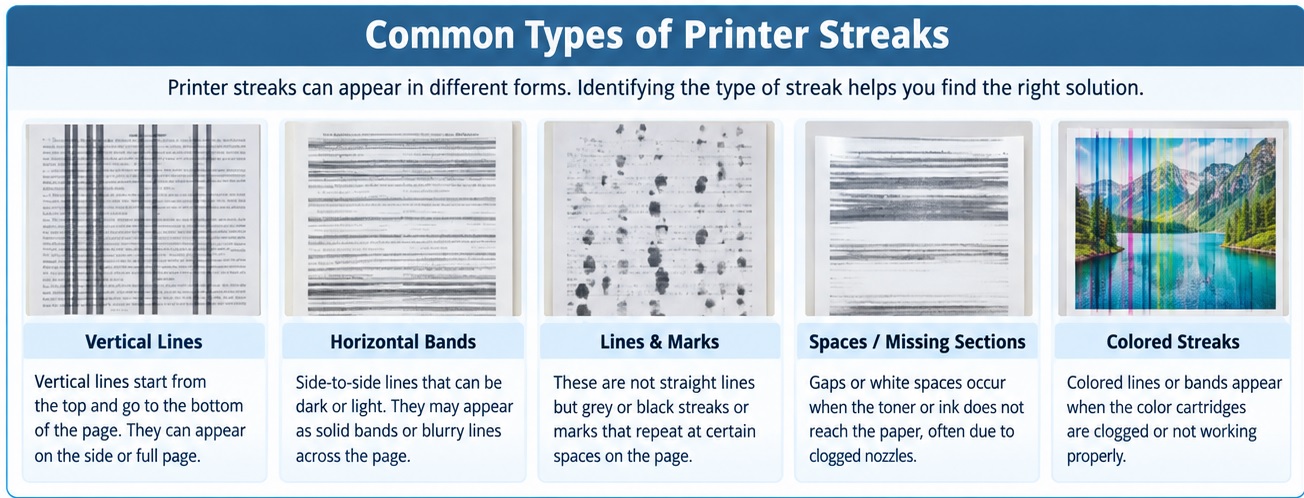
When the printer shows streaks on paper that come with different structures, and each has a certain name. Through these lines, positions and types, we can find errors. Commonly used printer lines are
Horizontal Lines
if you see side-to-side lines that are horizontal lines. Linescan can be dark or light, and in some conditions lines are blurry. These horizontal lines mean the print is clogged
Vertical Lines
Vertical lines start at the start of the page towards end points. That occurs on the side or full page. These streaks are 90-degree lines that occur through faults at the drum unit for laser printers and improper alignment for inkjet printers.
Lines & Marks
These are not lines but grey or black streaks. That mark is messy on the page. Result of when a roller in a printer has dust or toner applied at the wrong points
Spaces
When we take a print from the printer, it comes with spaces or gaps, resulting in the toner not reaching that paper part due to a clogged nozzle
What Causes Printer Streaks
Printer streaks occur due to many causes that must be considered before solving these faults
Clogged nozzles and dry ink
For an inkjet printer, a main source of streaks is the printhead. inkjet operated through applying microscopic droplets of ink from nozzles onto the page.
If the printer is not used for some time, ink becomes dry in the nozzles and blocks the path. As a result, faded horizontal bands occur, or thin streaks move in the direction the printhead moves.
Due to clogged nozzles and dried ink streaks, faded lines in prints. This error can be solved with operating the printer’s built-in printhead cleaning. Repeat that cycle about 3 times.
Low ink also causes streaks for inkjet printers; faded streaks occur when the cartridge is empty
Toner, drums, and fusers of laser printers
For laser printer power, that is toner used that is fused onto the page through heat. For laser printers, streaks occur with low toner, and the drum unit or fuser also has residue.
Black streaks on laser prints occur due to damaged drums. Low toner cartridge quantity causes streaks, so replace it to solve the error.
Drum damage causes streaks in the same location on every single page, and random streaks mean the printhead has faults.
Paper Problems
With printer paper also the main cause, using low-quality paper causes nonuniform printing. So use a fresh, clean apron for printing and store at dry location
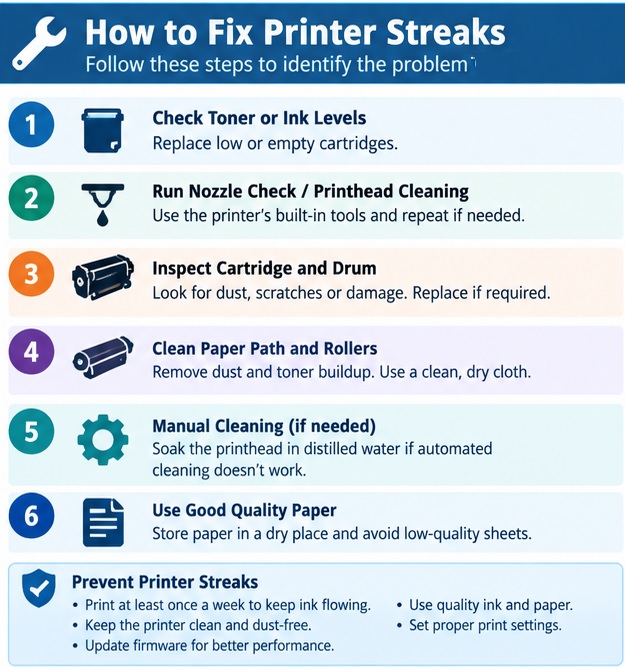
How to Fix Printer Streaks: Detailed steps
Read more 3D Printing vs. Traditional PCB Etching: Which Manufacturing Method Is Right for Modern Electronics?
Fixing printer streaks needs a proper solution for that; follow these points.
Inspect toner levels.
First of all, start the software of the printer on the computer; if the cartridge is low, replace it with a new one. That helps solve streaking.
Nozzle checking
Each printer comes with built-in features, normally in the Tools menu. That menu shows nozzles misfiring, that are helpful for solving streaks.
Run the printhead cleaning cycle
It is the best method for solving streaks in inkjet prints. Start the cleaning cycle and monitor through nozzle checking to find streaks solved. If streaks occur after many cycles, the printhead needs replacement
Cartridge and drum inspection
For the laser printer, open it and remove the toner cartridge and drum unit. Inspect affected parts that needed replacement for checking scratches and dust stuck on images.
Paper path and roller cleaning
If the printer provides access, clean the roller with a clean cloth and use fresh, store-dry paper to avoid moisture. since dusty rollers apply smudges on all pages
Manual cleaning the printhead
- If automated cleaning is not working on an inkjet, remove the printhead and soak the nozzle plate in distilled water.
How to Fix Streaks in Inkjet Printers
Here are steps explained for solving streaks in inkjet printers. Follow these steps.
First, apply the built-in print head cleaning process of the printer to remove dried ink and clogged print head nozzles.
Replace the cartridge if the ink level is low or the cartridges are old.
Set accurate alignment for the print head when text is misaligned; also, printed page results are not uniform
After performing print head auto cleaning, streaks are still produced. Manually clean print heads with the help of water
Dust buildup over paper feeding rollers causes streaks on prints. Clean dust and paper contamination over paper feeding rollers.
How to Fix Streaks for Laser Jet Printers
Follow these steps for fixing streaks for laser jet printers.
Change the toner for this to remove the previous and add a new one, then shake the cartridge.
After adding new toner, if you are still getting dark or light streaks, shake the toner cartridge.
Remove dust and extra toner gathered on the drum unit to prevent lines and marks in the printed output.
Inspect the printer and check for any ink leaking from the cartridge; if it occurs, replace it.
Clean extra toner that exits on the roller; also, because of streaks, clean it
How to Fix Streaks for Label & Thermal Printers
Follow these steps to solve streaks for label and thermal printers.
Streaks in these printers occur due to residues, dust, or paper fibers. Regular cleaning can prevent these errors.
Damaged printheads cause streaking, so replace the thermal printhead.
Printed pages have light results; set density or temperature settings for good printing
Printing a larger number of pages also causes streaks, reducing speed for easy transferring of images.
If dust accumulates on the roller, it causes streaks, so clean the platen roller.
How to Prevent Printer Streaks and Lines?
Proper maintenance is helpful for getting quality prints and removing errors.
First of all, perform printing once in weak; at least don’t let the ink in the printhead run dry.
Use quality ink, since low-quality cartridges use bad ink that causes nozzles to clog.
Perform cleaning of the printer properly to remove accumulated dust. Clean the main printer constantly working.
Set the printer in a clean room since dust and humidity affect its performance.
Printer firmware updates are also important for reliable functioning
Conclusion
Printer streaks are not a good thing since they become difficult to fix and cause trouble. Printer streaks occur due to clogged printheads, low-quality ink, dusty rollers, and damaged components. So clean the printer, use a new one after some time, use quality paper, and set good printing settings that prevent errors. Trying to find faults at the start helps you continue working the printer without streaks
FAQS
What are the main causes of printer print streaks?
Printer streaks occur through a clogged printer head, low ink level, dusty rollers or a damaged drum.
Why do laser printers print black lines?
black lines in laser printers are due to a damaged drum unit, toner leaking or a faulty fuser
Can low ink result in streaks when printing?
Yes, if the printer has low ink, it can cause missing colours, different lines, and blurred text.
How to Identify Line Types the Printer Is Producing
Different types of lines the printer produces that show different issues
What are the main causes printer prints streaks?
- Printer streaks occurs through clogged printer head, low ink level, dusty rollers or a damaged drum
Why laser printer print black lines?
- Black lines in laser printers are due to a damaged drum unit, toner leaking or a faulty fuser
Can low ink result in streaks when printing?
- yes if printer comes with low ink, causes missing colors, different lines, and also blurry text
How to Identify Line Types a Printer Is Producing
Different types of lines a printer produces that show different
| Line | Cause |
| Horizontal lines | Clogged printhead |
| Vertical streaks | Dirty rollers |
| White lines | Blocked printhead nozzles |
| Black streaks | Dirty toner |
| Colored streaks | Clogged color cartridge |