
Hello, friends, I hope all of you are having fun in your life. In today’s tutorial, we will have a look at the full form of INTERNET, its history, features, and applications. The full form of INTERNET is an interconnected network also known as ‘NET’. It is the worldwide (global) network of interlinked computers that interlink computers through IP (Internet Protocol) or TCP. It is a group of networks that comprises personal, education-related, private, and government networks that operate at the public level all over the world. All these networks are linked through different wireless, optical fibre, cable, and other electronic devices.
The internet provides a huge amount of pieces of information and features like interconnected hypertext files, email, calling and transfer of files from one server to another all over the world. The first internet started by ARPA (Advanced Research Projects Agency), which was created in 1960 to design strong, less-interrupted communications among computer systems. In 1980 the first network introduced to link educational and military systems was ARPANET (National Science Foundation Network). In today’s post, we will have a look at different parameters and features of the internet. So let’s get started with the full form of INTERNET
Full Form of INTERNET
The INTERNET stands for interconnected networks; it is a strong interlinking of different computer networks in the world that provides information transfer from one part of the world to others.
With the invention of the internet, the older communication methods such as phonos, T.V.s, radio, and newspapers were modified into new sources of communication such as electronic mail, internet telephones, internet TVs, online news, and live video calling.
Similarly, before the internet, books, newspapers, and other printing media were very famous and common to use, but with the creation of the internet, new replacements or modified forms came, such as news websites, blogging, etc.
Not only do we get news and online books, but we also do personal communication to the entire world through sending messages, forums, and other social communication tools.
The Internet also makes it easier to buy and sell anything from within the country to outside of the country. It also increases the business of small to large entrepreneurs.
Difference between WWW and INTERNET
| INTERNET | WWW | ||
| It is the worldwide connection of networks. | WWW is the collection of information that we search using the Internet. | ||
| It is like an infrastructure. | While the WWW is the most used part of the Internet. | ||
| INTERNET stands for interconnected networks. | WWW stands for the World Wide Web. | ||
| It was started in 1969 | It started in 1993 | ||
| Its first version was ARPANET (Advanced Research Projects Agency Network). | Its first version was the National Science Foundation Network (NSFNET). | ||
| It consists of interconnected computers, wires of copper, fiber optics, and wireless system. | It comprises documents, files, and folders saved in various linked computers. | ||
| It is controlled with the IP address. | It governed with the HTTP (Hypertext Transfer Protocol). | ||
| Its operation does not rely on the WWW.
| Its operation depends on the internet. | ||
| It is hardware | It is software | ||
Advantages of INTERNET
- Now we discuss the benefits provided by the internet with the detailed.
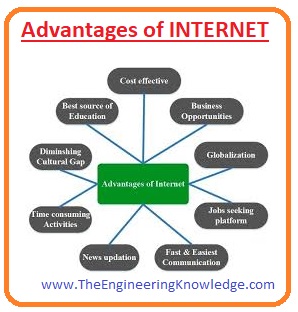
Electronic mail is a feature of the internet; by using it, we can send and receive information, files, and messages to any place in the world.
24-hour service
The services of the internet you can use 7 days a week and 24 hours a day.
Information:
The most important feature of the internet is that you can search for any type of information according to your requirements with just one click.
Due to this, your time or expenses are reduced to get data and information related to any topic you have to pay for, but on the internet, you can get all these without paying.
There are different search engines, such as Google, Yahoo, and MSN, to search from the internet.
Online Chat
By using the internet, you can chat with your friends relative all over the world, setting it in your room.
MSN and Yahoo are for online chatting.
Services:
There are numerous services delivered through the internet, such as online ticket service, hotel booking, job search, internet banking, etc.
Communities
Not only with your friends, but also with your relatives, you can connect with all types of communities existing in the world for your personal, business or international relationships.
E-commerce:
With the getting data, files, and information, you can also buy and sell any product to any customer in the entire world.
Software Downloading:
You can also get free and paid software for your use, as well as music, videos, movies, etc.
Limitations of the Internet
- Now we discuss the limitations of the internet with the detailed.
Personal Data Theft:
Different messages sent by the internet can be easily monitored and read by using some technical software.
Your personal info (name, address, and banking details) can get from any other person that tells us to use the internet for only limited pieces of information and not share personal info with the details.
Negative effect on family relationships
Most of the time spent on the internet decreases the time spent on family and other relatives, which also affects personal relations.
Children using NET
The internet used by our children is a major concern and causes serious issues in their character and health if they spend a large amount of time on the net and access such information that is not good for their age.
Virus threat:
The use of the internet can cause serious viruses for your computer and damage different files and folders and also the hard disk of your computer.
Services of INTERNET
Now we discuss the different services provided by the Internet in detail.
Electronic mail is the service provided by the Internet to send and receive messages, files, and information from one part of the world to another within very little time.
By using this method, the cost for courier and paper reduced and messages can be delivered within a few seconds.
FTP
FTP stands for file transfer protocol. It is software that allows us to upload and download different files. It makes it easier to get files and information existing at distant computers.
We can easily communicate with other computers existed in another part of the world.
Types of Internet Connections
- There are main 5 types of internet connections described here with the detailed.
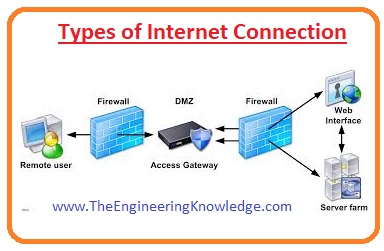
- VSAT
- DSL
- Dial UP
- Cable Modem
- Leased
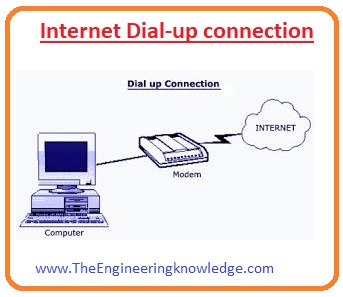
Dial-up connection
- This connection is made through the use of a modem. The modem links the computer with the phone line to get and send data from one server to another or interlinked computers.
- The price of this link is less.
- It provides security to your IP address.
- It is the best option to use the internet in distant areas where the wireless signal does not reach easily.
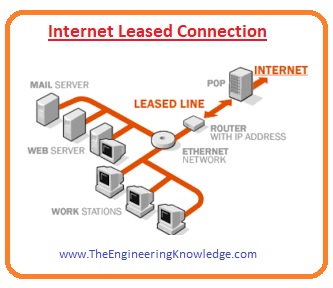
- This connection is also called a dedicated line, used to transfer of information and data among 2 personal computers.
- Due to limited use, this connection has high security.
- Its reliability is high, with less downtime.
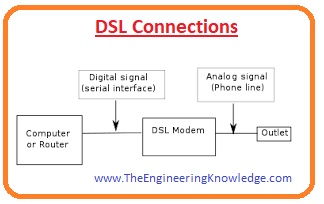
DSL Connections
- It stands for the digital subscriber line. By this connection, data is transferred through the wire used for the landline phone.
- It can easily be interlinked with the ATM (Automated Teller Machine) and WAN (wide area network).
- It provides high bandwidth.
- Less expensive for lines.
- It’s one disadvantage is that if a user is at a distant location from the main server data rate will decrease.
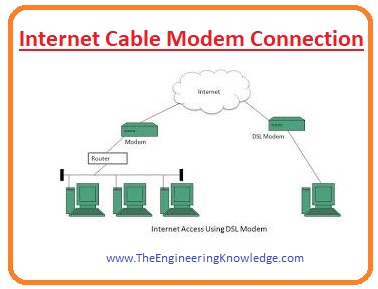
- It is a bridge-type network that uses RF (radio frequency), HFC(Hybrid Fiber Coaxial) and RFoG to transfer of data.
- It provides broadband internet in the shape of cable internet, with a high range of bandwidth.
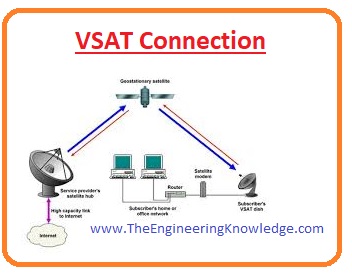
VSAT
- Its full form is a small aperture terminal and station located on Earth, and transfer of data such as live TV streaming, voice, and video through the satellite.
- There are 2 parts of this connection: the first is located on the satellite, and the second one is at the user end on a personal computer.
- Data can be transferred over longer distances at lower cost and with a high data rate.
- It can be easily upgraded.
- It increments in the price of one unit is less.
Read also
- Full Form of WWW, Working, Definition, Features & Applications
- What is DC Current Full Form, Working, Application & Features
- What is CPU: Full Form of CPU, Working, Types, Parts & Applications
- What is RAM: Full Form of RAM, Types, Working, Features & Applications
- Full Form of LCD, Working, Types, Features & Applications
friends that is the detailed post on the full form of the internet if you have any questions about this post ask in comments. See you in the next tutorial. Thanks for reading.







We are a family run dive centre in Cyprus, we love your content.
GOOD POST