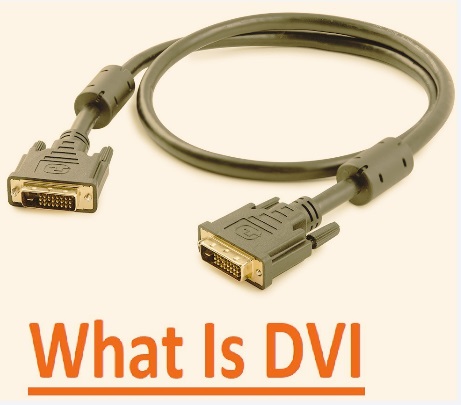
Digital Visual Interface (DVI) is a video interface made through the Digital Display Working Group (DDWG), which collaborated with the mutual work of Compaq, Fujitsu, Silicon Image, Intel, IBM, NEC, and HP in 1999. It is a digital connector that provides standard links for display devices such as computer desktops with video supply like CRT controllers.
Video Graphics Array is an analog connection standard that connects video cards and different video supplies with output devices such as computer monitors and projectors. In this post, we will cover detailed features of DVI and VGA and find their differences. So let’s get started.
What Is DVI?
- DVI’s full form is “digital video interface,” which is a standard offering high data transfer efficiency for modern video graphics cards and also increasing the quality of flat-screen LCD monitor output.
- DVI standards used as a replacement for the VESA plug and display standard. It comes with upgraded features compared to the digital-only VESA digital flat panel format that was used in older flat-screen models.
- DVI cables come with different cards outfitted in DVI output ports.
- DVI is used as the standard protocol for video interfaces. It is also part of digital transfer techniques for HDTV and some high-end video displays of DVDs and TVs.
- DVD players of the premium segment come with DVI output support and high-quality analog component video ports.
What Is VGA?
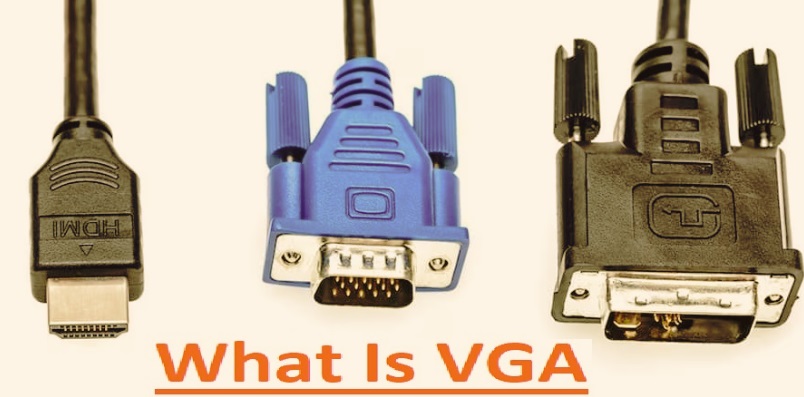
- VGA’s full form is “video graphics array.” That term is used for different cable types and connectors that come with a standard socket format and base pin design.
- This standard was first used in the late 1980s, and 15-pin VGA cables are a famous standard for connecting different electronic devices and transmitting video signals.
- About ten years ago, a VGA cable was part of personal as well as professional desktops. Their main use is to transmit visual signals for CPUs towards monitors.
- they were connectedwithdifferent sources like vide cards, laptops with output modules like projectors.
- Laptops come with a mini VGA port connection. These ports are small in size compared to full-sized VGA connectors and transmit graphical signals.
- Currently, VGA is important for making video connections in homes and commercial applications. They are replaced with HDMI interfaces.
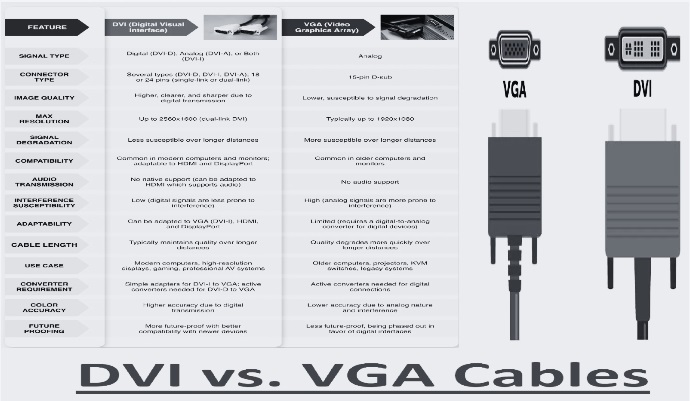
DVI vs. VGA Cables For Monitors Chart
| Feature | DVI (Digital Visual Interface) | VGA (Video Graphics Array) |
| Signal | Digital (DVI-D), Analog + Digital (DVI-I), Analog (DVI-A) | Analog only |
| Transmission technique | TMDS (Transition Minimized Differential Signaling) | Analog RGB voltage signals |
| Connector Types | DVI-D (single/dual link), DVI-I, DVI-A | DE-15 (15-pin D-sub) |
| Pin Count | 18+1 (single-link), 24+1 (dual-link), 29 pins (DVI-I) | 15 pins |
| Max Bandwidth | Single-link: ~3.96 Gbps; Dual-link: ~7.92 Gbps | No fixed bandwidth (analog), quality depends on cable & DAC |
| Max Resolution | Single-link: 1920×1200 @ 60Hz; Dual-link: 2560×1600 @ 60Hz | Typically up to 1920×1080 @ 60Hz (higher possible but degraded) |
| Refresh Rate Support | High refresh rates possible depending on resolution | analog signal quality |
| Image Quality | Pixel-perfect | Degrades due to noise, ghosting, and signal attenuation |
| Signal Conversion | No conversion needed for digital displays | Requires DAC (GPU) and ADC (monitor) |
| Interference Susceptibility | Very low (digital error correction) | High (EMI, crosstalk, cable quality sensitive) |
| Cable Length Impact | Minimal degradation up to ~5 meters (longer with quality cable) | Degradation beyond ~3–5 meters |
| Hot Plug Detection | Supported (DDC/EDID communication) | Limited / less reliable |
| EDID Support | Yes (via DDC channel) | Yes (via DDC, but less reliable) |
| HDCP Support | Supported (on DVI-D for protected content) | Not supported |
| Color Depth | 24-bit (8-bit per channel), higher with some implementations | Depends on DAC quality; less precise |
| Clock Signal | Embedded within TMDS data stream | Separate horizontal & vertical sync signals |
| Backward Compatibility | Can adapt to VGA (DVI-I with passive adapter) | Cannot convert to DVI digital without active converter |
| Audio Transmission | Not supported | Not supported |
| Power Delivery | Minimal (for signaling only) | Minimal |
| Physical Connector Size | Larger, bulkier connector | Smaller D-sub connector |
| Common Usage Era | Early 2000s–mid 2010s | 1990s–early 2010s |
| Modern Relevance | Obsolete but still found in older GPUs/monitors | Fully legacy, rarely used today |
DVI vs. VGA: Comparisons
DVI Types
- DVI-D comes with 3 main types; the first one, DVI-I, comes with pins used for digital and also analog signals.
- DVI-D comes with pins used for transmitting digital signals, and DVI-A offers analog signals.
- DVI-D is a male connector and DVI-I type for female DVI connectors since it manages other formats.
- DVI ports commonly used that come with pinholes open. but not always port supported with digital and analog signals
- DVI-D cables have features for making direct digital connections between video supply and output devices. This DVI connector also features higher-speed transmission quality images than the analog type. It’s different from VGA since all new video cards cause a digital signal. with VGA output that signal transformed into analog that moves towards output devices and then converted to digital signal. DVI-D reduces the analog conversion process and increases data transfer features from supply to display.
- DVI-A is opposite to DVI-D in operation and like VGA since it features the transmission of DVI signals into analog displays. It is beneficial for connecting DVI sources and devices with VGA output devices like CRT monitors and LCDs. DVI-A and VGA carry the same signal.
- The DVI-1 integrated cable has features for transmitting digital-to-digital and analog-to-analog signals. It employed digital and analog projects.
VGA Types
- It is either an older connection module that comes with different VGA cable types. Two main types are standard VGA and Super VGA.
- VGA cables transmit analog video signals and support 640×480 video resolutions.
- Super Video Graphics Array cables, also called Ultra VGA or Enhanced VGA, deliver analog video signals and are employed for high resolution, about 800×600. such as VGA and DVI, are also supported. Male VGA connectors come with protruding pins and plugs, and female VGA connectors come with holes and sockets.
- For making easy selection, accurate VGA cable connector identification occurs with gender. that helps to use accurate connections for devices.
- VGA adapters and extender adapters are helpful for making connections for certain applications. Adapters and splitters for gendered VGA cables come with male to female, female to female, female to male, and male to male.
- Mini VGA connectors are nonstandard ports employed on laptops and replacements for standard VGA.
Signal Quality
- Signal quality is an important factor. Digital and analog signal functions in different ways. DVI delivers digital video signals that maintain signal quality for longer distances than analog signals.
- Digital signals vary data in distinct steps and are less affected by electromagnetic interference or signal loss.
- While VGA employs an analog signal that faces difficulty maintaining quality for longer-distance cables. Since the video graphics array signal is continuous, it gets noise and distortion when moving. that affect image quality also cause color variations, reduce sharpness, and cause undesired visual effects
- Digital video signal strength makes DVI cable the best for applications where high signal quality is needed for longer distances.
- for longer cable digital visual interference, resulting in a clearer, sharper image than VGA.
Compatibility
- Digital visual interface commonly used for fordifferent applications like LCD monitors and the default option for home theater connections.
- New graphics cards and monitors come with digital visual interface ports. that is helpful for direct digital connections that provide quality signals and offer good image quality for high-resolution displays.
- Digital visual interface connection maintains digital signal clarity, offering sharp and clear images compared to video graphics array-like screens having resolutions more than 1080p.
- VGA ports are less common to use but still part of projectors, laptops, and monitors. It is helpful for operating older devices in operation with new devices. VGA connection does not get features of high-resolution display.
- • The shift to digital features like HDMI and DisplayPort has led to fewer VGA ports for new devices. but VGA is best for some operations, like for older devices or when connecting adapters with connecting older devices with new devices.
Is it possible to Connect DVI to VGA?
Yes, it can be done, but it needs some factors before connecting DVI with VGA. First of all, find the DVI port type on your required device. When the port type is identified, use the best passive adapter for DVI-I or DVI-A connections, or an active digital-to-analog converter when working with DVI-D.
When a connection is made, make modification settings of the device that come with refresh rate, resolution management, and display mode for making the required connection with the VGA input.
Digital-to-analog conversion affects image quality due to the difference between signal types. VGA high-resolution features are less compatible with DVI, resulting in low display functions.
For applications where a clear image and resolution are important, using a clear digital interface is the best option.
Conclusion
DVI is the best option for advanced projects that are high, replaced with HDMI and DisplayPort due to high features. application where high-resolution and quality images are needed, DVI is the best option to use. but VGA is still employed since VGA is proper for function maintenance for older systems that needed high-resolution output not based on priority.