
Hello, fellows, I hope all of you are enjoying your life. In today’s tutorial, we will have a look at the full form of LCD, its construction, applications, and uses. The full form of LCD is liquid crystal display. This module consists of 2 types of matter: the first is solid and the second is liquid. To display images, it uses liquid crystals. The screens of liquid crystal have less thickness, so they are easily used in laptops, computers, televisions, cameras, etc. Before the invention of an LCD, a cathode ray tube was used in the screens of TVs, computers, etc., which made the screens bulky and large, but after the use of LCDs, all displays have become less thick. LCD comprises different layers with the 2 polarized panel filters and probes (electrodes). The lens is used to project light on the liquid crystals.
The colored image is formed with a mixture of colored light and grayscale. There are 2 types of displays in LCDs. The first one is an active matrix display grid (it uses a silicon backplane instead of an indium tin oxide conductive surface), and the second one is a passive display (it uses a grid of vertical and horizontal conductors consisting of indium tin oxide (ITO) to make an image). Most mobile phones that have liquid crystal displays use an active matrix display. Older screens are still passive displays. In today’s post, we will have a detailed look at its working, construction, applications, and some related parameters. So let’s get started with the full form of LCD.
Full Form of LCD
The word LCD stands for liquid crystal display, also known as a flat panel display, which operates by using the liquid crystal properties of light modulation.
Like LEDs, which generate light, LCDs do not generate but use reflectors to make images in a single color.
There are 2 types of images shown by the LCD. The first one is arbitrary images that are displayed on a computer or laptop, and the second one is fixed images that provide less info.
The fixed images further provide two features that can be shown or hidden, like the preset display of words, numbers (digits), and the numbering display in a digital clock.
Both of these images display similar techniques but also have some differences: one is formed by using a small pixel matrix, and the other has a large-size matrix.
The configuration of polarizers decides the on (positive) and off (negative) state of the liquid crystal display.
There are numerous applications of liquid crystal displays, such as TVs, laptop screens, computer monitors, mobiles, screens, etc.
Small-dimension liquid crystal display screens are normally used small sizes electronic devices such as mobiles, watches, calculators, clocks, cameras, etc.
With the creation of liquid crystal displays, the size of electronic devices has also become smaller due to the replacement of the cathode ray tube with the LCD.
In older cathode ray tubes, very few size variations were exhibited, but now LCD provides a large number of size variations from smaller watches to large-size screens of a TV.
As LCD replaces the cathode ray tube, similarly, LCD will also be replaced in the next few years by OLED (organic light-emitting diode).
The features provided by OLED are quick response, many colors, less bulkiness and thickness, less use of energy, and no need of a backlight.
With the benefits of OLED, there are some drawbacks, such as its price being high as compared to LCD and if damaged, it cannot be repaired again, while the LCD can be.
Construction of LCD
First of all, we discuss some parameters that we should keep in mind before the construction of LCD.
The light used must be polarized.
The liquid crystal used in the construction of liquid crystal displays has the ability to vary the polarization and transmission of light.
The design of liquid crystals can be varied by the input current.
There are 2 polarized glasses needed as filters for the construction of liquid crystals used in LCDs.
If the glass is not polarized, then rub the upper part of the glass with a certain polymer to make it so that it will make the glass a polarizer by making minor grooves on the glass.
The direction of all grooves on the glass should align or be in the same direction.
After that, it puts the layer of air-filled liquid-phase crystal on one polarizing filter of the polarized glass.
The tiny channel aligns the first layer of molecules to bring it into line with the filter direction.
When the first layer is at ninety degrees, then put the 2nd glass having a polarized sheet.
The first filter is automatically polarized as the light rays collide with it at the initial point.
As light passes through the first layer and moves to the others with the guidance of molecules.
After reaching the endpoint of the liquid crystal, it starts to vibrate like the vibration of the last layer molecules.
The light is permitted to enter into the device only if the 2nd layer of the polarized glass matches the last layer of the molecule.
Working of LCD
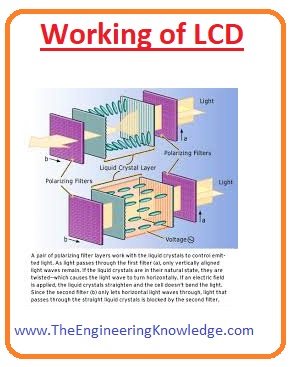
The operation of the LCD is that as current is provided to the molecules of liquid crystals, the molecules show some rotation.
Due to this, the angle of light passing through the polariser varies, and also the angle of the upper polariser filter varies.
Due to this small intensity of light, it passes through a smaller area of the liquid crystal display.
The working principle of LCD blocks the light. For this, a light-blocking mirror is placed at the back end.
The indium tin oxide (ITO) electrode is placed on the upper and polarised glass at the lower part of the LCD.
The 2nd glass has an electrode in a rectangular shape on the lower side and a polariser sheet on the upper portion.
The position of both glasses should be at 90° to each other. If the current is not passing, then the light moving through the front part will be reflected by the mirror in the back direction.
The electrode linked with the battery: the current coming from the battery will drive the liquid crystal between the common plate electrode and the rectangular electrode to change position.
So with this method, the light will stop passing on, and this specific area will be shown with no colour.
Difference between LCD and OLED
- These are some differences between the LCD and OLED.
OLED | LCD |
| It stands for Organic Light-Emitting Diode | It stands for liquid crystal display |
| Its screen is made with an organic medium like carbon. | It screen is made with liquid crystal. |
| Every pixel on the screen has its own light. | In this module, background light is used normally lamp. |
| The pixels of OLED can be on and off independently; due this OLED shows different colors. | While in LCD, pixels are not on and off independently; they use light at the background and pixel panels to block white light and make different colors. |
| Its brightness is high | Its brightness is low. |
| It needs less power when there is less color on the screen | It needs high power. |
| When the color is white it uses large power. | It uses less power. |
| Due to the used of organic material, its working life is less. | Its operating life is high |
| Its price is also high | Its price is less compared to OLED |
Difference between LCD and LED
- These are some difference between LCD and LED that is described here with the detailed.

LED LCD
| It is constructed with semiconductor material and emits light when current flows through it. | This is an optic device that displays information in the shape of pictures and numbers. |
| It stands for a light-emitting diode. | It stands for liquid crystal display. |
| In this module, no backlight is required. | It uses a fluorescent lamp for a backlight. |
| Its resolution is high. | Its resolution is less. |
| It consumption power is high | its power usage is less. |
| Its display area is less compared to LCD. | Its display screen is large. |
| This device is expensive. | it is less expensive. |
| It is manufactured with gallium arsenide phosphide. | It is constructed with the liquid crystal and glass electrodes. |
| Its switching needs less time. | Its switching is a slow speed |
| It can also operate on Direct current. | DC can damage its operating life. |
| It does not use mercury | It uses mercury. |
Features of LCD
Now we discuss the features of LCD.
Resolution
The quality of resolution provided by the liquid crystal display depends on the number of pixels in rows and columns exited in the display.
Every pixel further has three subpixels, of blue, red, and green color.
In new technologies in the subpixels, there are further subpixels called Quattron that increase the resolution of LCD.
Color performance:
Numerous terminologies explain the color performance of the LCD.
Like color gamut, which explains the color variations, and color depth is accuracy that defines the variations in the colors during color gamut.
Color gamut is a very important specification; it only takes into consideration at a professional level, not on the customers’ purchasing level.
There are some other features related to the color, that are a white point and gamma correction. These features explain how the other colors will be shown according to the white color.
Brightness and contrast ratio:
The ratio among the fully shown (on) pixels to completely off pixels is called a contrast ratio.
While extreme light shown by the liquid crystal display is called brightness of LCD, it depends on the backlight used in LCD.
Advantages of LCD
These are some advantages of liquid crystal display.
The physical construction and size are less as compared to the large-size cathode ray tube.
It also uses less energy as compared to older CRT monitors having similar dimensions.
It loses some heat due to an all amount of power usage.
In LCD the geometrical distortion is less.
The background light used in the LCD explains the flickering.
It does not release harmful radiation like the cathode ray tube.
It can be designed in any shape and size according to user requirements.
It can be created more than eighty inches.
It is not affected by the magnetic field.
It operates at a twelve-volt power supply.
Disadvantage of LCD
These are some disadvantages of liquid crystal display.
Due to the limited viewing angle in older LCDs, there is a decrease in contrast and brightness.
In less temperature conditions its brightness decreases.
There is also a decrease in contrast due to temperature.
So friends, that is the detailed post on the full form of LCD. I have written each and every aspect related to LCD. Also, do a comparison among the LCD, LED, and OLED. If you have any further queries and want something else, you can ask in the comments. Thanks for reading. See you in another next interesting tutorial. Have a good day.